
 Credit & Billing
 Welcome to our Credit and Billing Help page.
Here, you will find answers to common questions, guidance on managing your account, and information on how to contact us for further assistance.
- Go to fwwebb.com.
- Log in to your account.
- Hover over your account number.
- Go to My Account.
- Select 'Pay Your Bill' under ‘My Purchases’.
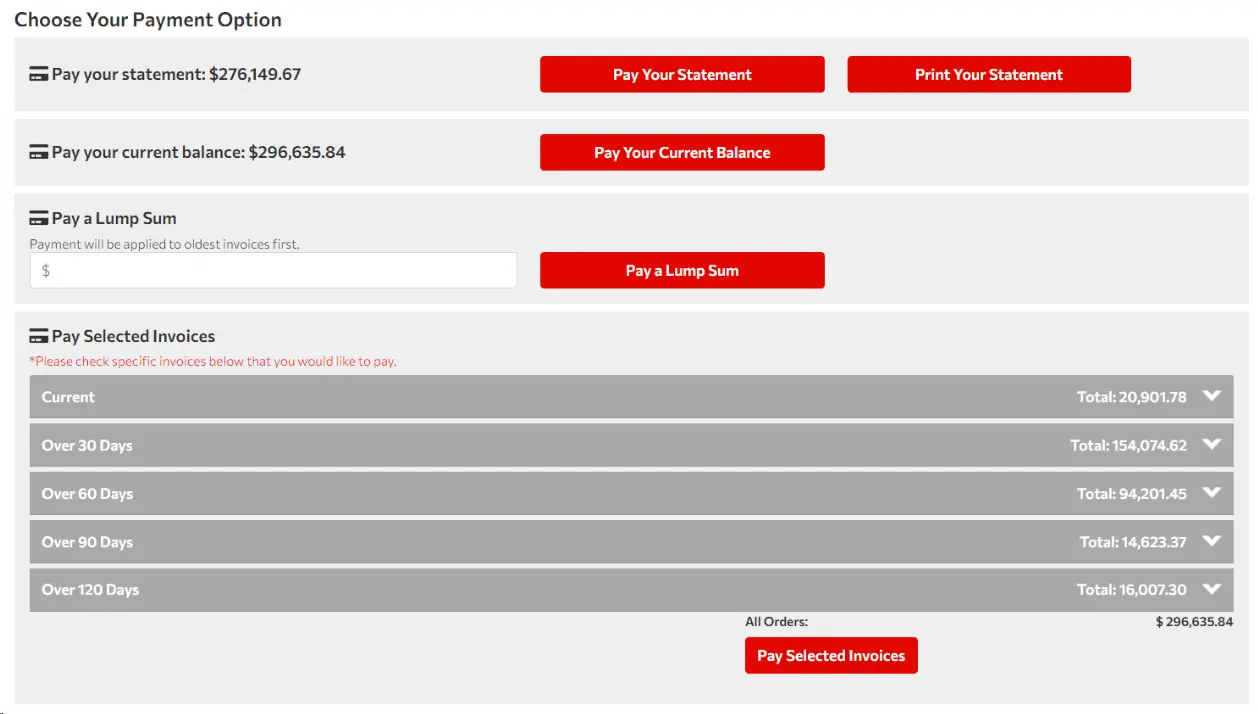
- Choose a payment option:
- Pay Your Statement.
- Pay Your Balance.
- Pay Lump Sum.
- Pay Selected Invoices.
- Log in to your account.
- Navigate to the 'Invoices' section in the account flyout under 'My Purchases'.
- Click on the 'Invoice ID' number to see the invoice details.
- If you already have a COD account with us and wish to have a credit line, please follow these steps:
- SIGN IN
- Hover over your Customer Account Number.
- Select My Account.
- Select Request Credit Terms.
- Fill out and sign the form. There is a 2-3 day review period on the request.
- Our Credit Department will contact you via email or phone call if further information or additional signatures are required to complete.
- If you do not have a Customer Account with F.W. Webb, you must register first before signing up for credit terms.
Paying Your Bill
To pay your bill online or to check your balance:
Please note: Our accounting cycle typically concludes on the 25th of each month, with the exception of December 31st.
Viewing Your Bill
Applying for Credit Line
Credit & Billing Contact Information
For any other inquiries, please contact 781-272-6600 and ask for accounts receivable.